
Offshore Hosting Guides
A whole server, in miniature
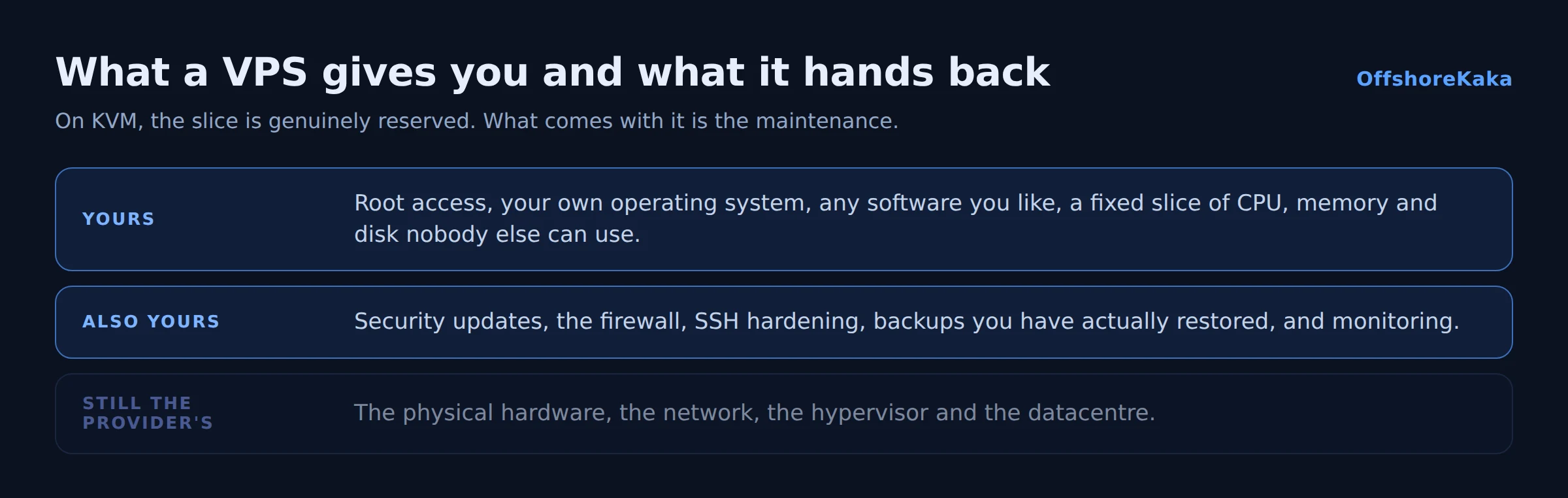
A VPS is one physical machine divided into several isolated virtual machines. Each one gets its own operating system, its own root access, and a fixed slice of CPU, memory and disk that nobody else can use.
The offshore part just means that physical machine sits in a country you chose on purpose, typically the Netherlands or Germany. The technology is identical to a VPS anywhere else.
How it differs from shared hosting
On shared hosting, hundreds of sites run on one server sharing one pool of resources. It is cheap and someone else maintains it. The downsides are that a busy neighbour can slow you down, and you cannot install anything the host has not provided.
On a VPS, your slice is reserved. The 2GB of RAM you paid for is yours whether you use it or not, and no other customer can take it. You get root, which means any software, any configuration, any PHP version, anything at all.
The trade is maintenance. Nobody is patching your kernel or watching your disk space. That is now your job, and skipping it is how VPS servers end up compromised. There is a fuller comparison in VPS versus shared hosting.
Why KVM matters
Two kinds of virtualisation get sold as VPS and they are not equivalent.
KVM is full virtualisation. Your VPS has its own kernel, and the memory allocated to it is genuinely reserved. You can run any operating system, load kernel modules, and run Docker properly.
Container based virtualisation, OpenVZ and LXC, shares the host kernel between all customers. It is cheaper, and it allows overselling: the provider can allocate more memory across containers than the machine physically has, betting nobody uses it all at once. When that bet is wrong, everyone slows down, and the numbers on your plan stop meaning anything.
Ask which one you are buying. If the answer is vague, assume container. We went into the detail in why KVM isolation matters.
When you actually need one
Honest test: if shared hosting is doing the job, stay on shared hosting. Move to a VPS when one of these is true.
- You need root. A specific PHP extension, a custom nginx build, Redis, a Node application, a service that needs a system package.
- You have outgrown shared limits. Hitting CPU or process limits, or your host has asked you to upgrade.
- You need isolation. Consistent performance rather than performance that depends on strangers.
- You host clients. Separate accounts, your own nameservers, your own backup schedule.
- You want a fixed IP nobody else touches. Relevant for mail reputation, since a shared IP inherits its neighbours’ behaviour.
Sizing it
The usual mistake is buying cores and skimping on memory. It should be the other way round.
- RAM is what kills sites. When it runs out, the kernel kills MySQL, and the site throws database errors that look like a database problem. 2GB is a realistic floor for one real site.
- Cores control concurrency, not the speed of a single page. Two is plenty for most sites, particularly with caching on.
- NVMe is worth insisting on. On the random reads a database does constantly it is roughly a hundred times faster than a spinning disk.
- Disk size should be about double your data, to leave room for backups and updates.
There is a full sizing table in choosing VPS specs.
What becomes your job
This is the part that decides whether a VPS was the right call.
- Security updates. Weekly at minimum, or automated.
- The firewall. A default install accepts connections on everything that is listening.
- SSH hardening. Key only, no root login. Automated scanners find a new IP within the hour.
- Backups. Nobody is taking them for you, and a backup you have never restored is not a backup.
- Monitoring. Disk space especially. A full disk takes the site down in a way that is genuinely confusing to diagnose.
Our VPS security checklist covers the first hour, and it is about twenty five minutes of work.
Before you buy
- KVM confirmed, not container based.
- RAM sized with headroom, since this is what fails hardest.
- NVMe storage confirmed.
- Datacentre location confirmed, not just the company address.
- A web console in the panel, for when you lock yourself out with a firewall rule.
- Snapshots or backups available.
- Honest answer to whether you will actually maintain it.
Looking at a VPS?
OffshoreKaka VPS servers run on KVM with AMD EPYC and NVMe in Amsterdam and Frankfurt, with full root access and a console in the panel.
FAQ
Do I need Linux skills?
For an unmanaged VPS, yes, or a control panel and the discipline to keep it patched. Installing aaPanel takes ten minutes and covers most daily tasks through a browser. What no panel does is remove the responsibility for updates and backups.
Is a VPS faster than shared hosting?
Not automatically. A well configured shared plan with LiteSpeed and caching often beats a VPS that has been set up carelessly. What a VPS gives you is consistency, because your resources are reserved rather than shared with strangers.
What happens if I lock myself out?
Any decent provider gives you a web console in the panel, which works like a monitor and keyboard plugged into the machine and does not depend on SSH. Check this exists before you buy. It is what turns a firewall mistake into a two minute fix.
Does a VPS help my Google ranking?
Only through speed and uptime, and only if the server was the bottleneck. On most slow sites it is not; caching and page weight matter more. Our TTFB guide shows how to find out which you have.