
Offshore Hosting Guides
The web server is not the point. The cache is.
Hosts advertise LiteSpeed as though the web server itself is the speed. It is not, or at least not by much. Swapping Apache for LiteSpeed and changing nothing else gains you something, but not enough to notice.
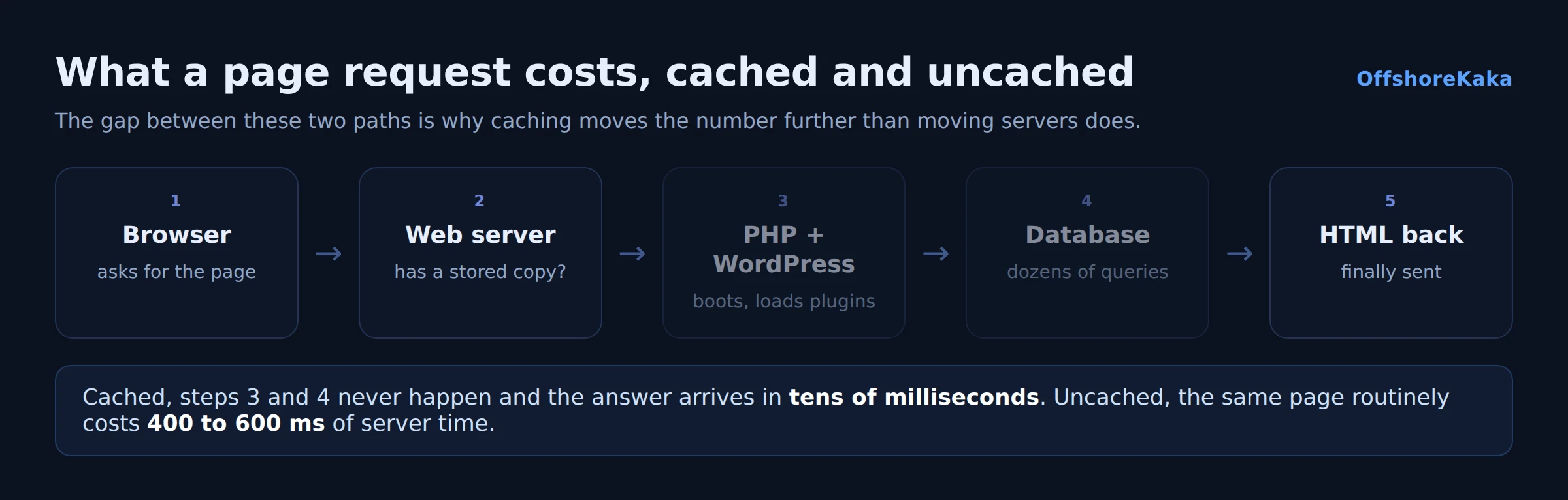
What actually matters is LSCache, a page cache built into the web server rather than bolted on as a PHP plugin. That is what takes a WordPress page from several hundred milliseconds down to tens. Buying LiteSpeed hosting and not enabling it is the most common way to pay for something and not receive it.
Why a server-level cache is different
A normal WordPress cache plugin is PHP. A visitor arrives, the web server starts PHP, PHP loads WordPress, WordPress loads the cache plugin, and the plugin says “here is a saved copy”. You saved the database queries and the template rendering, which is most of the cost, but you still paid for PHP to boot.
LSCache stores the page inside the web server. A cached request never starts PHP at all. The server recognises the URL, finds the stored copy and sends it. That is the difference between roughly 80 milliseconds and roughly 10.
The catch, and it is a real one: LSCache only works on LiteSpeed or OpenLiteSpeed. Install the plugin on nginx or Apache and it does nothing at all. It is not a general purpose cache plugin.
What this means for SEO
Being honest about the size of this effect matters, because a lot of hosting marketing overstates it.
Speed is a confirmed ranking signal through Core Web Vitals, and server response time feeds into Largest Contentful Paint. But it is a small signal, and it behaves like a tiebreaker between pages that are otherwise comparable. A fast page with thin content will not outrank a slow page with the answer people wanted.
Where speed genuinely pays off is everything around ranking. Visitors abandon slow pages, and a page nobody stays on sends the wrong signals over time. Crawl budget improves too: a faster server means Googlebot fetches more pages per visit, which matters on a large site.
So treat it as: fix speed because visitors care, and take the ranking benefit as a side effect. Our TTFB guide covers measuring it properly rather than guessing.
Getting it working
On shared hosting with LiteSpeed, this is two steps:
- Install the LiteSpeed Cache plugin from the WordPress repository.
- Turn caching on in its settings, and leave the rest at defaults to begin with.
The defaults are sensible. The temptation is to enable everything on the optimisation tabs at once, which is how people break their site layout and then conclude caching is dangerous. Turn on page caching first, confirm the site still looks right, and only then experiment with CSS and JavaScript combining, one setting at a time.
On your own VPS you install the server first. Our LiteSpeed install guide covers that, including the cache root setting that has to be enabled at server level for the plugin to have anything to write to.
Verifying it
curl -sI https://yourdomain.com/ | grep -i x-litespeed-cacheThe first request after a change is a miss. The second should be a hit. If every request is a miss, one of two things is happening:
- You are logged in. Logged in sessions bypass the cache deliberately, because they see personalised content. Always test in a private window.
- Something sets a cookie on every request. Chat widgets, analytics and some security plugins do this, and a unique cookie makes every visitor look different, which defeats caching entirely. This is the most common cause of a cache that is installed and doing nothing.
Where it will not help
Caching only helps pages that can be cached. Be realistic about what that excludes.
- Logged in users see uncached pages. If your site is a membership site or a shop where people are signed in, most of your traffic bypasses the cache.
- Cart and checkout must never be cached, for obvious reasons.
- Search results and anything with query parameters usually are not cached.
- Slow front end is a different problem. If your pages carry three megabytes of images and a dozen third party scripts, the server can respond instantly and the page will still feel slow.
For the uncached path, the levers are OPcache, a current PHP version, and a database that is not dragging megabytes of autoloaded options through memory on every request.
Checklist
- Host confirmed to be running LiteSpeed or OpenLiteSpeed.
- LiteSpeed Cache plugin installed and page caching on.
- Cache hit confirmed in the response headers, in a private window.
- No plugin setting a unique cookie on every request.
- Optimisation settings enabled one at a time, not all at once.
- OPcache on and PHP on a current version.
- Front end weight checked separately from server response.
Want LiteSpeed already configured?
OffshoreKaka runs LiteSpeed Enterprise with LSCache tuned on NVMe servers in Amsterdam and Frankfurt, so cached pages are served without touching PHP.
FAQ
Is LiteSpeed really faster than nginx?
For serving static files, they are close enough that it does not matter. The genuine difference is LSCache, which has no direct nginx equivalent that is as easy to set up. On nginx you would use fastcgi_cache, which is capable but needs configuring by hand and does not integrate with WordPress the way the plugin does.
Can I use the LiteSpeed Cache plugin on Apache?
No. The plugin talks to the LiteSpeed server. On Apache or nginx it installs and appears to work but caches nothing. Use WP Super Cache, W3 Total Cache or fastcgi_cache instead.
Will switching to LiteSpeed improve my ranking?
A little, indirectly, through faster page loads. It is a small signal and it will not lift weak content. The bigger reason is that visitors stay on fast pages, and the crawler gets through more of your site per visit.
Is OpenLiteSpeed the same thing?
Same core, same LSCache, free. The differences are that it does not read .htaccess, so rewrite rules go in the vhost, and it is limited on workers. For one site it is fine, and our install guide covers the gotchas.