
Tutorial
Two records, one small decision
Pointing a domain at offshore hosting is genuinely a two minute job. What turns it into a bad afternoon is doing it in the wrong order, or changing nameservers when you only meant to change an A record.
The difference matters. An A record change moves the website. A nameserver change moves everything, including email, and if the new provider does not have your mail records, mail stops that same hour.
A record or nameservers?
Decide this before you log in anywhere.
Change only the A record if your DNS is somewhere you are happy with and you are just moving the website. Your mail, your subdomains and your verification records all stay exactly where they are. This is the safe option and it is what most moves need.
Change the nameservers if you want the new host to manage DNS as well. Everything moves at once. Before you do it, copy every existing record, because the new provider starts with whatever it guessed, and anything it missed simply stops working.
If you are unsure, change the A record. You can always move nameservers later.
Lower the TTL first
The TTL is how long resolvers cache your record. Until it expires, they keep serving the old answer no matter what you change.
dig +nocmd yourdomain.com +noall +answerThe number before the record type is the TTL in seconds. If it is 3600 or 86400, set it to 300 and then wait for the old value to expire before you make the real change. That wait feels pointless and it is the difference between a switch that lands in five minutes and one that leaves visitors on the old server all day. Our DNS propagation guide explains the mechanics.
Making the change
Get the new server’s IP from your hosting welcome email or the panel. Then in your DNS provider:
- Edit the A record for
@and set it to the new IP. - Edit the A record for www, or set www as a CNAME to the bare domain.
- Leave MX and TXT alone unless mail is moving too.
Make sure the site actually works on the new server before you do this. Most hosts give you a temporary URL or let you test by IP with a hosts file entry. Pointing the domain at a server that is not ready gives every visitor a broken site.
Verifying it
dig +short yourdomain.com
dig +short www.yourdomain.com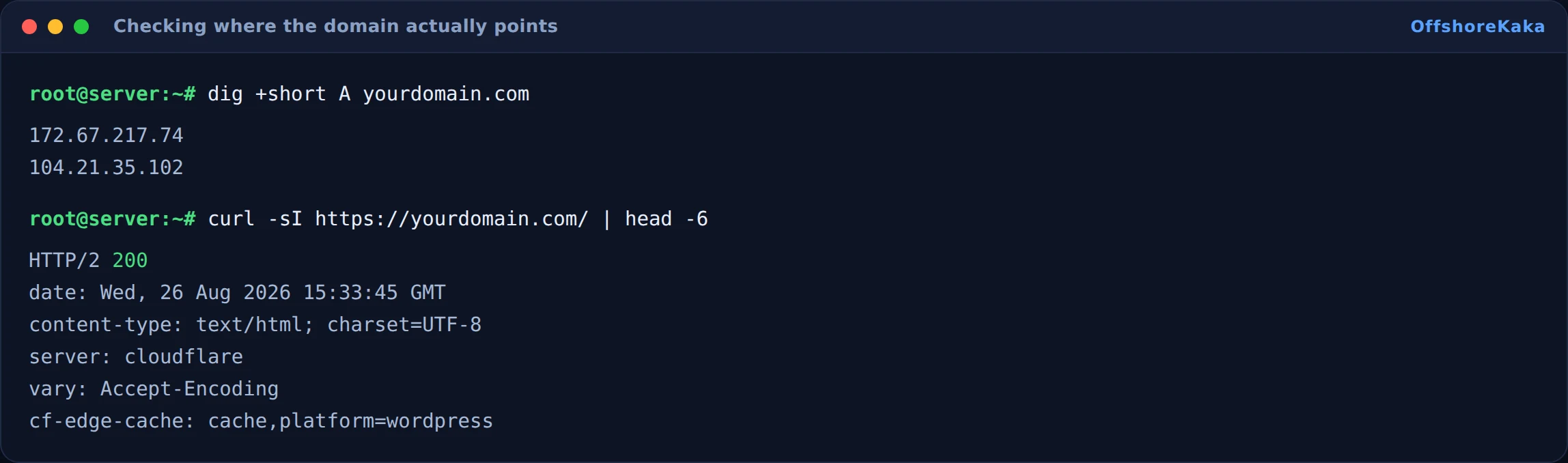
Check both names. www being forgotten is one of the most common problems after a move, and it is invisible if you only ever type the bare domain.
Then check what the server actually returns:
curl -sI https://yourdomain.com | head -5A 200 means the new server is serving. A 301 to somewhere unexpected usually means the old host still has a redirect in place, or the vhost on the new server does not match the domain name.
Keeping SEO intact
A hosting move does not cost you rankings on its own. Google sees the same URLs returning the same content and carries on. What does cost you is downtime, or URLs quietly changing.
- Keep the URLs identical. Same paths, same trailing slashes. If anything has to change, redirect the old URL to the new one with a 301.
- Keep the old server running for 48 hours. Visitors still resolving to the old IP get a working site rather than an error.
- Get the certificate sorted before the switch, not after. A certificate warning stops both visitors and crawlers. See our SSL guide.
- Check robots.txt on the new server. Staging copies often carry a Disallow line, and moving that to production quietly removes you from search.
That last one is worth checking by hand. It is a one line file and it can undo months of work.
How to test
dig +short yourdomain.comreturns the new IP.- Same for www.
- Homepage and an inner page both load over HTTPS.
curl -sI https://yourdomain.com/robots.txtand read it.- Send yourself an email from outside to confirm mail still works.
- Check the new server’s access log is receiving traffic.
- Use URL Inspection in Search Console on one page.
When something breaks
| What you see | Why | Fix |
|---|---|---|
| Still the old site after the change | TTL has not expired, or local DNS cache | Wait, and check with dig @8.8.8.8 |
| Bare domain works, www does not | Only one record changed | Update the www record too |
| Email stopped | Nameservers changed and MX records were not carried over | Re-add the MX records exactly as they were |
| Certificate warning | New server has no certificate yet | Issue one now that DNS resolves here |
| Redirect loop | Cloudflare SSL mode is Flexible, or a leftover redirect on the old host | Set Full (strict), and clear old redirect rules |
| Site vanished from Google after the move | robots.txt from staging came along | Fix robots.txt and request reindexing |
Checklist
- Decided between A record and nameservers, deliberately.
- TTL lowered a day in advance.
- Site tested on the new server before DNS was changed.
- Both the bare domain and www updated.
- MX and TXT records left alone, or carried across in full.
- Certificate valid on the new server.
- robots.txt checked.
- Old server left running for 48 hours.
Moving a domain over?
OffshoreKaka gives you a temporary hostname so you can test the whole site before you change a single DNS record, and free migration help if you want it done for you.
FAQ
How long until it takes effect?
As long as the old TTL, roughly. With a 300 second TTL set in advance, minutes. With a 24 hour TTL and no preparation, up to a day for some visitors. Nothing you do after the change speeds it up.
Will my email break?
Not if you only change the A record. Mail follows the MX records, which are separate. It only breaks if you move nameservers and the new provider does not have your MX records, which is exactly why copying every record first matters.
Should I use Cloudflare instead?
It makes future changes much faster, because with a proxied record you can repoint a site instantly rather than waiting on caching. It is a good move, just not one to make at the same time as a server move. Our Cloudflare guide has the steps.
Will this affect my rankings?
Not if the URLs stay the same and the site stays up. Google recrawls, finds the same content, and nothing changes. Downtime and changed URLs are what cause damage, not the move itself.