
Server Guides
Propagation is not what most people think
There is no wave of updates spreading across the internet. What actually happens is simpler: every resolver that already looked up your domain cached the answer, and it keeps serving that cached answer until the timer runs out. That timer is the TTL, and you set it.
So the whole thing is predictable. If your TTL is 300 seconds, everyone is on the new server within five minutes. If it is 86400, some people are on the old one for a day. Getting this right is mostly about lowering the TTL before you move.
Lower the TTL first
This is the step that decides whether your migration takes five minutes or two days, and it has to happen before anything else. Check what your TTL is now:
dig +nocmd yourdomain.com +noall +answerThe number before the record type is the TTL in seconds. 3600 is an hour, 86400 is a day.
Set it to 300 and then wait for the old TTL to expire before you migrate. If it was 86400, you wait a full day. That feels like a waste of time and it is the single most useful thing you can do, because after that wait every resolver is checking back every five minutes and the actual switch is nearly instant.
Put it back to 3600 or higher a few days after the move. A permanent 300 second TTL means more DNS lookups than you need.
Making the switch
Move the site first, DNS last. The new server should be fully working, tested by IP or by a temporary hostname, before a single visitor is pointed at it. Our WordPress migration guide covers getting the copy right.
Then change the A record and check what your own machine sees:
dig +short yourdomain.comIf it still shows the old IP, your local resolver is holding the old answer. That is expected. Ask an authoritative server directly to see the truth immediately:
dig +trace yourdomain.comChecking from outside
Your own view is one data point and not a very good one. Ask several public resolvers, since they cache independently:
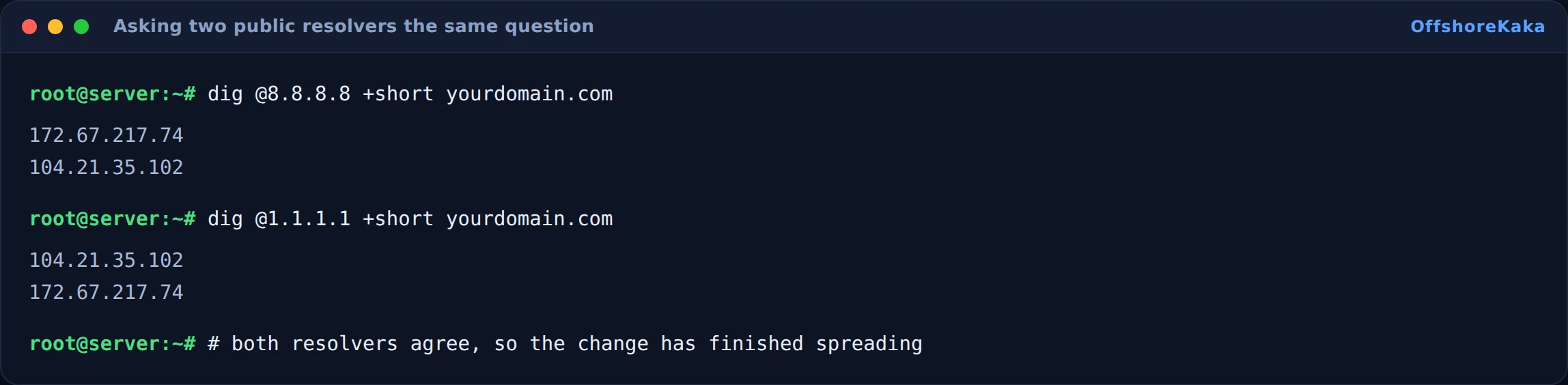
Do the same for www, since it is often a separate record and gets forgotten:
dig @8.8.8.8 +short www.yourdomain.com
dig @1.1.1.1 +short www.yourdomain.com
Web based propagation checkers are useful for a global view, but they check from a limited set of locations and they cache their own results. The dig commands are faster and more honest.
Why the old server stays up
Leave it running for 48 hours after the switch. Not because DNS needs it, but because of what arrives there in the meantime.
- Orders and form submissions from visitors still hitting the old IP. If you shut it down you lose them silently.
- Email, if the old server handled mail. MX records cache exactly the same way.
- The comparison. If something looks wrong on the new server, having the old one still running lets you check what it used to do.
Before you finally shut it down, check its access log for the last few hours of traffic. If it is still receiving real requests, wait longer.
The split-brain problem
During the overlap, two copies of your site are live and both accept writes. A comment posted on the old server never reaches the new one. An order taken on the old server is invisible on the new one.
For a brochure site this does not matter. For anything with a database that changes, it matters a lot. Two ways to handle it:
- Put the old site in read-only mode right after you switch DNS. Disable comments, checkout and form submissions on it, with a short notice pointing people to try again shortly.
- Redirect the old server to the new one by IP, so anything landing there gets forwarded rather than served.
The second is cleaner if you can do it. Nobody sees a broken experience and no data is written in two places.
How to test after the switch
dig @8.8.8.8 +short yourdomain.comreturns the new IP.- Same for www.
- The site loads over HTTPS with no certificate warning. A new server usually needs a new certificate.
- Send yourself an email from outside and confirm it arrives.
- Check the new server’s access log is receiving traffic.
- Check the old server’s access log is going quiet.
- In Search Console, use URL Inspection on a couple of pages to confirm Google sees the new server.
When something breaks
| What you see | Why | Fix |
|---|---|---|
| Some visitors see the old site for days | TTL was never lowered before the move | Nothing to do but wait it out. Keep the old server up |
| Certificate warning after the switch | New server has no certificate for the domain | Issue one. See our SSL guide |
| www works, bare domain does not | Only one of the two records was changed | Update both A records |
| Email stopped | MX records were left pointing at the decommissioned server | Point MX at whoever handles your mail now |
| dig shows the new IP but the browser shows the old site | Browser DNS cache, or a stale local hosts entry | Restart the browser and check /etc/hosts |
| Orders missing after the move | They were taken on the old server | Export from the old database and merge, then read the split-brain section above |
Checklist
- TTL lowered to 300 and the old TTL allowed to expire before moving.
- New server fully tested by IP before DNS changed.
- Both the bare domain and www updated.
- Confirmed with two independent public resolvers.
- Certificate valid on the new server.
- Mail tested inbound.
- Old server kept running for 48 hours, and read-only or redirecting.
- TTL raised again once things are stable.
Planning a move?
OffshoreKaka gives you a temporary hostname so you can test the whole site on our servers before you touch a single DNS record.
FAQ
How long does propagation really take?
As long as your old TTL, roughly. With a 300 second TTL set a day ahead, most people are on the new server within minutes. With a 24 hour TTL and no preparation, expect stragglers for a day or two. The often quoted 48 hours is a worst case that assumes badly behaved resolvers.
Can I make it go faster once I have already switched?
No. The answers are already cached and the timers are already running. Lowering the TTL now only affects lookups that happen after the current cache expires. This is why the preparation step exists.
Should I move DNS to Cloudflare as part of this?
It makes future changes much faster, because Cloudflare’s proxied records let you repoint a site without waiting on DNS caching at all. Doing it at the same time as a server migration means two variables changing at once though. Move the server first, settle, then move DNS. Our Cloudflare guide has the steps.
Will a migration hurt my rankings?
Not if the URLs stay the same and the site stays available. Google recrawls, sees the same content at the same addresses, and carries on. What does cause damage is downtime during the switch, or URLs changing without redirects.