
Tutorial
What this guide does
You will put your domain behind Cloudflare so that visitors hit Cloudflare first and Cloudflare talks to your offshore hosting server behind it. You get free SSL, a faster DNS lookup, and your origin IP stops being public.
The step that actually matters is the nameserver change, because that is the one that can take your email down if you rush it. Copy your MX and TXT records before you touch anything else.
Save your records first
Open your current DNS panel and write down every record before you start. Not just the A record. The ones that break silently are the email records, because a website loading fine tells you nothing about whether mail is still being delivered.
- A records for the domain and for www, pointing at your hosting IP.
- MX records, with their priority numbers. These route your mail.
- TXT records, especially SPF, DKIM and any verification strings from Google or Microsoft.
- CNAMEs for anything like a mail subdomain or a helpdesk.
Take a screenshot of the whole list. It costs you ten seconds and it is the only thing that will save you if a record goes missing halfway through.
The four steps
Step 1: Add the site to Cloudflare
Sign up at cloudflare.com, click Add a site, type your domain without www, and pick the Free plan. Cloudflare then scans your existing DNS and imports what it can find.
Step 2: Check what the scan actually imported
This is the step people skip. The scanner is good but not perfect, and it misses records fairly often, particularly TXT records and anything on an unusual subdomain. Compare the imported list against the notes you took, line by line, and add back anything missing.
Pay attention to the cloud icon next to each record. Orange means Cloudflare proxies that record and hides your server IP. Grey means it just answers the DNS query and sends traffic straight to your server. Your website records should be orange. Your mail records must stay grey, because Cloudflare does not proxy SMTP and an orange cloud on a mail record will stop mail from arriving.
Step 3: Change the nameservers at your registrar
Cloudflare gives you two nameservers with people names in front, like journey.ns.cloudflare.com. Log in to wherever you bought the domain, find the nameserver setting, remove the existing entries and put the Cloudflare pair in.
This is the switch. Until you do it, nothing you configured in Cloudflare is live. After you do it, Cloudflare is answering every DNS query for your domain.
Step 4: Point the A record at your server and set SSL mode
In the DNS tab, confirm your A record holds your offshore server IP with the orange cloud on. Then open SSL/TLS and set the mode to Full (strict).
Do not leave it on Flexible. Flexible means Cloudflare talks to your server over plain HTTP while showing visitors a padlock, which is a lie to your visitors and causes redirect loops with any host that forces HTTPS. Full (strict) requires a valid certificate on your server, which any decent host gives you free. If you need one, our SSL install guide covers it.
Verifying it worked
The dashboard saying Active is a good sign but not proof. Ask the DNS system directly:
dig +short NS yourdomain.com
If you still see your old host in that output, the change has not spread yet. Registrar changes usually show up within an hour, though the official window is up to 48. Nothing is wrong, you just have to wait.
Next, check where the domain resolves to and what the server sends back:
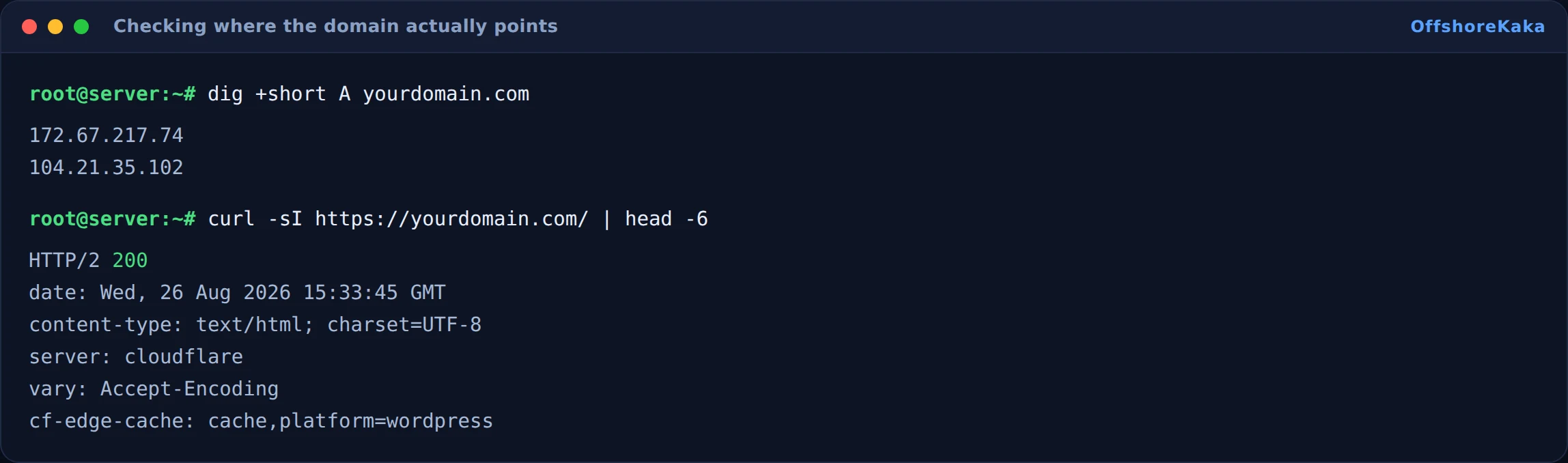
Those addresses belong to Cloudflare, not to you, and that is the whole point. Anyone looking up your domain now sees Cloudflare. Your offshore server sits behind it.
Keeping email alive
Mail is the thing that breaks, so give it its own check. Query the mail records directly rather than trusting the dashboard:
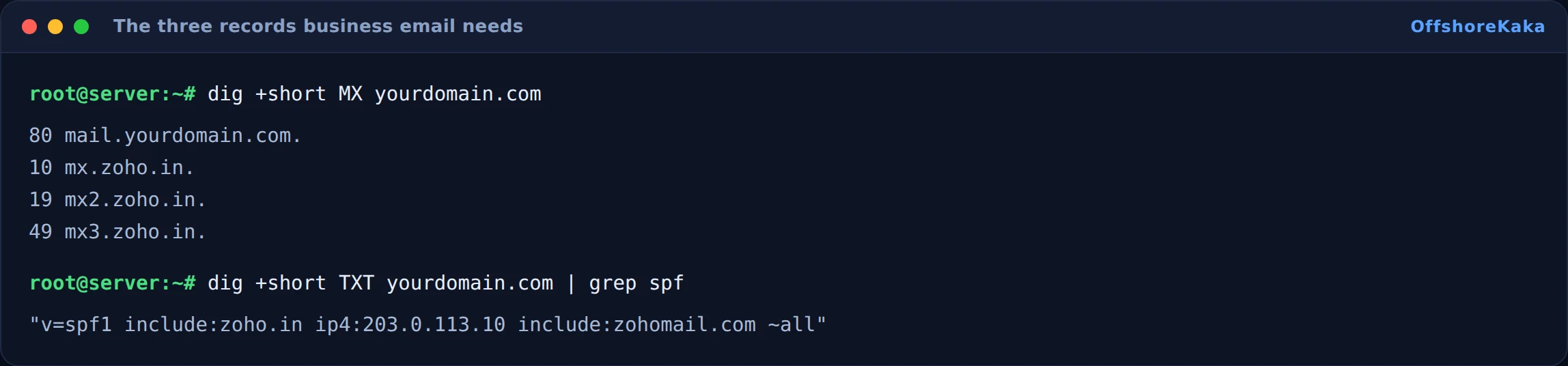
Then send yourself a real message from an outside address, such as a personal Gmail account, and confirm it arrives. A test that only sends mail out proves very little. Delivery inbound is what breaks.
One more thing worth knowing: if your SPF record lists your server IP and you have just put Cloudflare in front, the SPF record still needs the real server IP in it. Cloudflare proxies web traffic, not mail, so the sending IP has not changed.
When something breaks
| What you see | Why | Fix |
|---|---|---|
| Site does not load after the switch | DNS is still spreading, or the A record is wrong | Run the dig check above, then confirm the A record holds your server IP |
| Too many redirects | SSL mode is Flexible while the server forces HTTPS | Switch to Full (strict) |
| SSL warning in the browser | No valid certificate on the origin | Install a certificate on the server, or use a Cloudflare origin certificate |
| Email stopped arriving | MX record missing, or proxied with an orange cloud | Re-add the MX record from your notes and set the cloud to grey |
| Visitors all appear to come from one IP in your logs | The server is logging Cloudflare rather than the visitor | Enable the real IP module on your web server, or use the CF-Connecting-IP header |
Checklist
- Every existing record written down before starting.
- Site added and the scanned records checked against your notes.
- Mail records present and set to grey cloud.
- Nameservers changed at the registrar and confirmed with dig.
- A record on your server IP with the orange cloud on.
- SSL mode set to Full (strict).
- A real inbound test email received.
Need the hosting that sits behind Cloudflare?
OffshoreKaka runs privacy friendly web hosting in Amsterdam and Frankfurt, and every plan includes a free SSL certificate so Full (strict) works out of the box.
FAQ
Does Cloudflare actually hide my server IP?
For anything with an orange cloud, yes. Visitors and scanners see a Cloudflare address. It is not absolute though. If your mail records point straight at the same box, or an old DNS record is still floating around in a historical database, the real IP can be worked out. Hosting mail somewhere separate from your website closes that gap.
Will this speed up my site?
DNS lookups get faster, and static files get cached at the edge close to your visitors. What it will not fix is a slow server response, because a cache miss still has to wait for your origin. If your pages are slow to generate, start with our TTFB guide instead.
Can I undo it?
Yes, completely. Put the original nameservers back at your registrar and the domain goes back to your old DNS. That is why writing down the originals is step zero.
Does using Cloudflare help my ranking?
Only indirectly. A faster site and working HTTPS are both things Google likes, but neither is a ranking boost on its own. What you rank for still comes down to the content and who links to it.