
Server Security
What this guide does
A fresh offshore VPS accepts connections on every port that has something listening. Most of the time that is more than you think: a database, a mail daemon, a panel, whatever the image shipped with. This guide closes all of it down to the three ports a web server actually needs, without cutting off your own SSH session while you do it.
The dangerous moment is ufw enable. If SSH is not allowed at that instant, the connection you are typing into dies and does not come back.
See what is exposed now
Start by finding out what is listening, because that decides which rules you need. There is no point guessing.
ss -tulpn
Anything bound to 127.0.0.1 is already safe and needs no firewall rule at all. A database bound to 0.0.0.0 is a problem, and the right fix is to bind it to localhost in its own config rather than to paper over it with a firewall rule.
The four steps
Step 1: Install UFW and set the defaults
apt install ufw -y
ufw default deny incoming
ufw default allow outgoing
Deny incoming, allow outgoing. That is the whole philosophy. Nothing gets in unless you name it; your server can still reach out for updates and API calls. Neither of these commands turns the firewall on, so nothing has changed yet.
Step 2: Allow the ports you need, SSH first
ufw allow OpenSSH
ufw allow 80/tcp
ufw allow 443/tcp
Do SSH before anything else. ufw allow OpenSSH uses the shipped profile for port 22. If you have already moved SSH to another port, as covered in our SSH hardening guide, use the number instead: ufw allow 2222/tcp. Get this wrong and step 3 locks you out.
Add mail ports only if this box actually handles mail. If your mail lives at Google or Zoho, port 25, 465, 587, 993 and 110 should all stay shut.
Step 3: Turn it on
ufw enableIt will warn you that this may disrupt existing SSH connections. Read that warning rather than clicking past it. If you followed step 2, you are fine.
Before you press enter, open a second SSH session to the same server and leave it sitting there. If the firewall does cut you off, that second session is still connected and you can run ufw disable from it.
Step 4: Read the rules back
ufw status verbose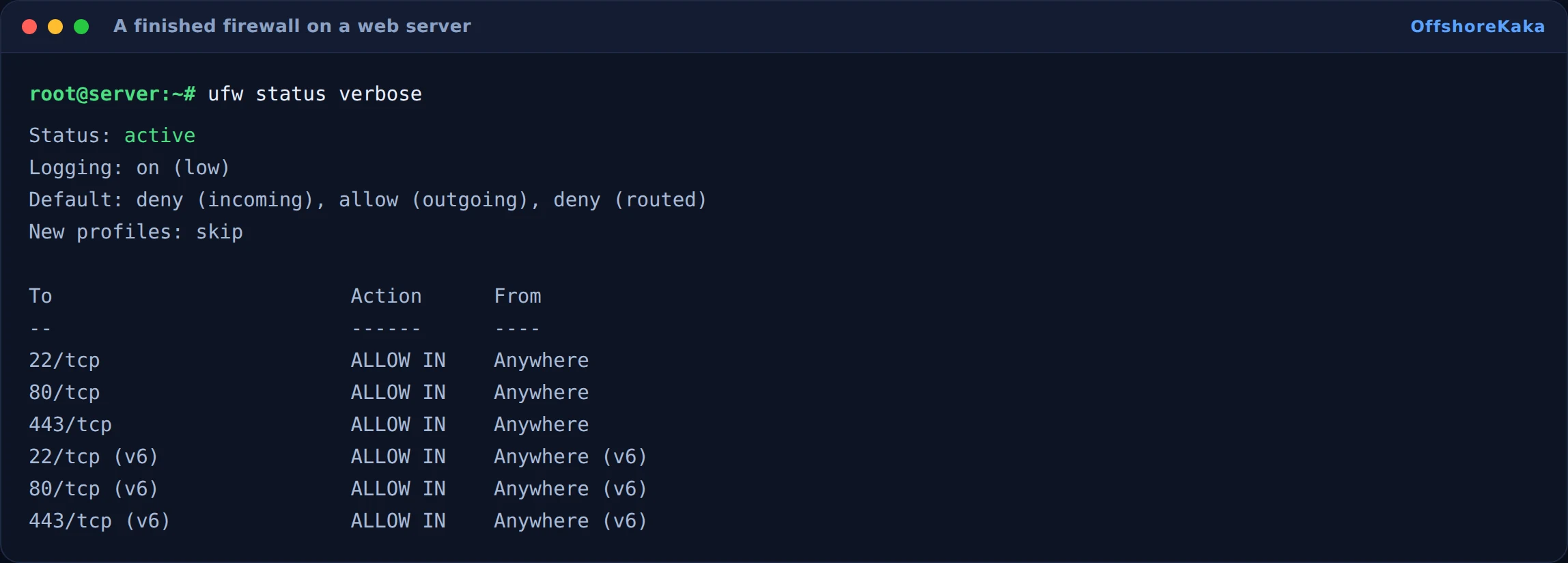
Every line you cannot explain is a line to remove. Use ufw status numbered and then ufw delete 4 to drop one by its number.
If you run a control panel
This is where people get caught out. aaPanel, CyberPanel, Webmin and cPanel all listen on their own ports, and a lot of them install their own firewall layer as well. Turning on UFW underneath one of those gives you two firewalls disagreeing with each other.
- aaPanel uses a random high port set at install time, plus 888 for phpMyAdmin. Find it with
bt defaultand allow that port, or you will lock yourself out of the panel. - cPanel and WHM use 2082, 2083, 2086, 2087 and 2096. cPanel servers normally run CSF rather than UFW, and running both is a bad idea. Pick one.
- CyberPanel uses 8090.
The safer pattern with a panel is to restrict the panel port to your own IP rather than leaving it open to the world:
ufw allow from 203.0.113.5 to any port 8888 proto tcpAlmaLinux and Rocky
These use firewalld, not UFW. Same idea, different commands:
firewall-cmd --permanent --add-service=ssh
firewall-cmd --permanent --add-service=http
firewall-cmd --permanent --add-service=https
firewall-cmd --reload
firewall-cmd --list-all
The --permanent flag writes the rule to disk but does not apply it until the reload. Leave it off and the rule disappears on the next reboot, which is a very confusing thing to debug three weeks later.
How to test
- Load your website over HTTP and HTTPS.
- Open a fresh SSH session in a new window.
- From your laptop, try a port that should now be closed:
nc -zv your-server-ip 3306. It should time out or refuse. - Run
ufw status verboseand read every line. - If you run a panel, log in to it once to confirm the port is still reachable.
When something breaks
| What you see | Why | Fix |
|---|---|---|
| SSH dies the moment you enable UFW | SSH was never allowed, or it is on a custom port | Use the provider web console, run ufw disable, allow the right port, enable again |
| Website unreachable but SSH works | 80 and 443 not allowed | ufw allow 80/tcp and ufw allow 443/tcp |
| Panel login stopped working | The panel port is not in the rules | Find the port with bt default or your panel docs and allow it |
| Rules vanish after a reboot | firewalld used without --permanent |
Re-add with --permanent, then --reload |
| Site still reachable on a port you blocked | Cloudflare or another proxy is in front, or Docker wrote its own iptables rules | Test the origin IP directly, and check iptables -L DOCKER |
Checklist
- You know what was listening before you started.
- Defaults set to deny incoming, allow outgoing.
- SSH allowed on the correct port, before enabling.
- A second SSH session open as a safety net.
- Only 80 and 443 open beyond SSH, unless you have a documented reason.
- Panel port restricted to your own IP rather than open to everyone.
- Rules read back and every line understood.
Want a VPS where the firewall is yours to run?
OffshoreKaka VPS servers come with full root access and a panel console, so a firewall mistake is a two minute fix rather than a support ticket.
FAQ
Do I need a firewall if I am behind Cloudflare?
Yes, and arguably more so. Cloudflare only protects traffic that goes through Cloudflare. Anyone who learns your origin IP can hit the server directly and skip it entirely. A firewall that only allows Cloudflare IP ranges on ports 80 and 443 closes that hole. Our Cloudflare DNS guide covers the setup side.
UFW or CSF?
UFW if you are on a plain Ubuntu or Debian VPS and want something you can read at a glance. CSF if you are on cPanel, since it is what that ecosystem expects and it brings login failure blocking with it. Do not run both.
Should I block whole countries?
Rarely worth it. It is easy to get around with a VPN, it blocks real customers, and the rule lists get big enough to slow the firewall down. Blocking specific abusive IP ranges after you see them in your logs works far better.
Does a firewall help my search ranking?
No. It keeps the site up and uncompromised, and a hacked site absolutely does lose rankings, so there is an indirect connection. But no search engine gives you credit for having one.