
Offshore Hosting Guides
What developers actually want from a host
Not a dashboard. Root access, a predictable machine, an IP that is not on a blocklist, and a provider that does not suspend an account because an automated scanner found something it did not understand.
Offshore VPS hosting tends to score well on all four, and the jurisdiction is often a side benefit rather than the reason. This page covers what to look for and where the traps are for an application rather than a website.
The four requirements
KVM, not containers. Docker needs real virtualisation to work properly, and a container based VPS either blocks it or runs it degraded. Memory on a container plan is also oversellable, which means your numbers are aspirational. Check with systemd-detect-virt, and see why KVM matters.
A console in the panel. VNC or noVNC, something that works when SSH does not. You will lock yourself out with a firewall rule at some point, and a console turns that into two minutes instead of a support ticket.
Snapshots. Take one before every risky change. Being able to roll back a bad migration in ninety seconds changes how confidently you work.
A clean IP. Check it against major blocklists before you build anything on it. A recycled IP can arrive with a history that breaks your outbound mail on day one.
Running the stack
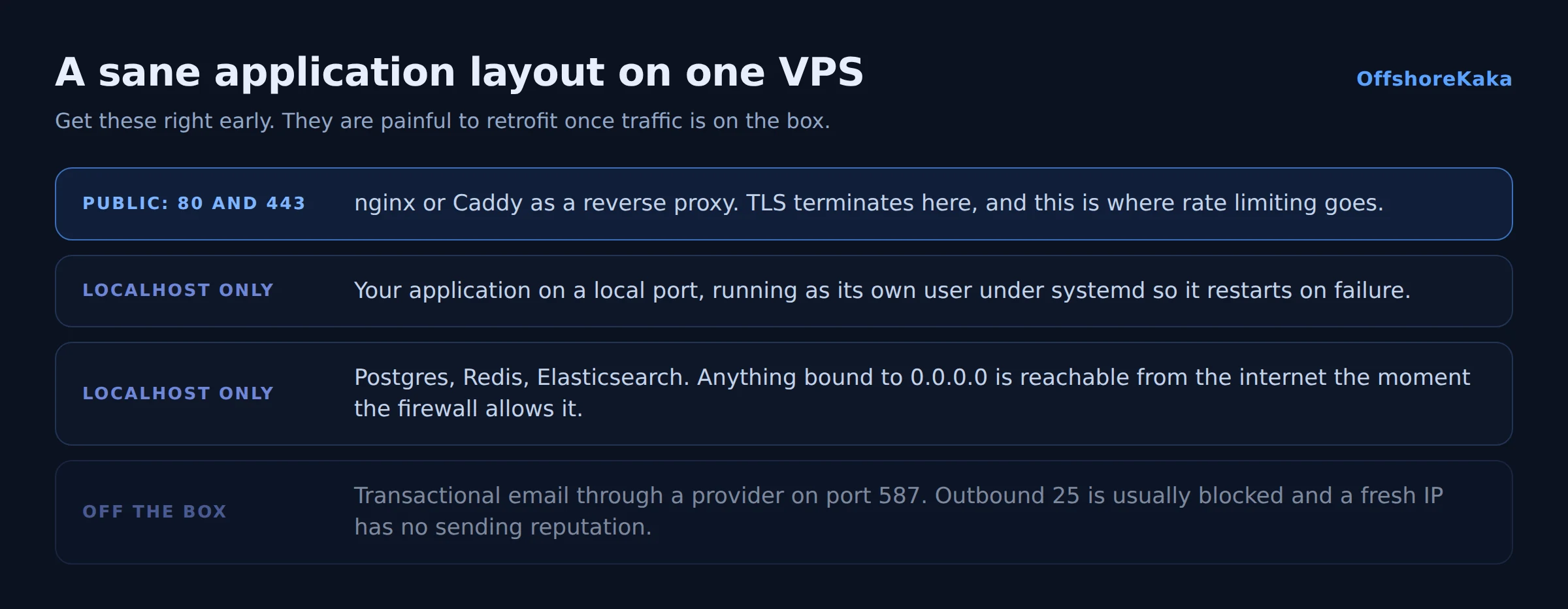
Whatever you run, a few things are worth getting right early because they are painful to retrofit.
Bind services to localhost. Postgres, Redis, MongoDB and Elasticsearch all default to a broad bind address in some packages. Anything on 0.0.0.0 is reachable from the internet the moment the firewall lets it through, and unauthenticated Redis on a public IP is compromised within hours.
ss -tulpn | grep -v 127.0.0.1Run that after any install. Everything in the output should be something you deliberately exposed.
Use a reverse proxy. nginx or Caddy in front, your application on a local port. That gives you TLS termination in one place, easy multi-app hosting, and somewhere to add rate limiting.
Run the app as its own user, not root. Then a compromise in the application is not a compromise of the machine.
Set up the firewall before the app is public, not after. Our firewall guide covers the order that avoids locking yourself out.
Deploys and staging
Even solo, deploying by editing files over SSH stops being viable quickly. Two habits pay for themselves within a month.
Deploy from git. Pull on the server, or push to it, but have the state of production be something you can identify by commit. When something breaks at 11pm, knowing exactly what changed is the difference between a fix and an archaeology session.
Have a staging environment. A subdomain with its own database, where migrations run before they run on real data. Our staging guide covers building one that cannot accidentally write to production.
Add a systemd unit for the application so it restarts on failure and comes back after a reboot. Then actually reboot the server once and confirm everything returns. That test finds more problems than any amount of reading config files.
Transactional email
This catches out nearly every SaaS project on a new VPS, so it is worth flagging clearly.
Many providers block outbound port 25 by default to limit spam, so your application’s password reset emails silently fail. Even where it is open, a fresh IP has no sending reputation and mail from it lands in spam.
Do not fight this. Send through a dedicated provider over port 587 with proper authentication, and set SPF, DKIM and DMARC on the domain. Our email guide covers the records. Trying to run your own mail sender on a new IP is weeks of work for a worse result.
Scaling
Scale vertically first. Doubling the RAM on one machine is an hour of downtime; splitting into multiple machines is an architecture change. Most applications never need the second one.
When you do split, the usual first move is putting the database on its own server, because databases want memory and applications want CPU, and separating them lets you size each properly.
Before any of that, check you are not simply short on one resource. Load average against core count, available memory, and the wa figure in top will tell you which. Our sizing guide covers reading them.
Checklist
- KVM confirmed, Docker verified working.
- Console access available in the panel.
- Snapshots available and tested once.
- IP checked against blocklists before building.
- Every service bound to localhost unless deliberately public.
- Application running as a non-root user under systemd.
- Firewall configured before the app went public.
- Deploys from git, with a staging environment.
- Transactional mail through a dedicated provider.
- Backups running and one restore tested.
Building something?
OffshoreKaka VPS servers are KVM with full root, snapshots, NVMe and a console in the panel, in Amsterdam and Frankfurt.
FAQ
Can I run Docker on an offshore VPS?
On KVM, yes, exactly as anywhere else. On container based virtualisation it is often blocked or crippled, because Docker wants kernel features the host will not expose. This is the single best reason to insist on KVM.
Is offshore hosting a problem for a SaaS with EU customers?
The opposite, usually. Hosting in Germany or the Netherlands means your data is processed inside the EU under GDPR, which is the easiest possible answer when a customer asks where their data lives. It is a selling point rather than an obstacle.
How do I handle the database as I grow?
Keep it on the application server until it stops being comfortable, then move it to its own machine on a private network. Do not skip straight to a managed database service unless you have priced it, because managed databases are usually the most expensive line on a small project’s bill.
What about uptime for a paying product?
One VPS is one point of failure, and no amount of provider quality changes that. If customers pay for availability, you need monitoring at minimum and a tested restore path. Our monitoring guide covers what to watch and what to alert on.