
Offshore Hosting Guides
The gap is smaller than the price difference
A good KVM VPS already gives you root, your own operating system, and reserved memory. So what does bare metal add, and is it worth three to five times the money?
The honest answer is that it depends entirely on whether your load is sustained. Bursty traffic is what virtualisation is good at. Constant heavy work is where dedicated hardware pulls ahead, and where the price starts making sense.
The real differences
Hypervisor overhead. Small on modern processors, a few percent. Not the reason to buy metal.
Disk I/O. This is the big one. On a VPS the disks are shared with other tenants, so your throughput depends on what they are doing. On bare metal the drives are yours, and for a database writing constantly that difference is large and consistent.
Memory ceiling. VPS plans top out. If your database working set is 200GB, no VPS plan holds it and every query hits disk. Bare metal goes as far as the motherboard does.
Hardware control. RAID level, extra drives, specific CPU features. Invisible from inside a virtual machine.
Predictability. Nobody else’s workload can affect yours, ever. Not just usually.
Side by side
| KVM VPS | Dedicated server | |
|---|---|---|
| Root access | Yes | Yes |
| Memory | Reserved, capped by plan | All of it |
| Disk I/O | Shared with other tenants | Entirely yours |
| Provisioning | Minutes | Hours to days |
| Resize | Change plan, reboot | New machine, migration |
| Hardware choice | None | CPU, disks, RAID |
| Recovery access | Panel console | IPMI |
| Price | Low | Three to five times more |
Steal time, the number that decides it
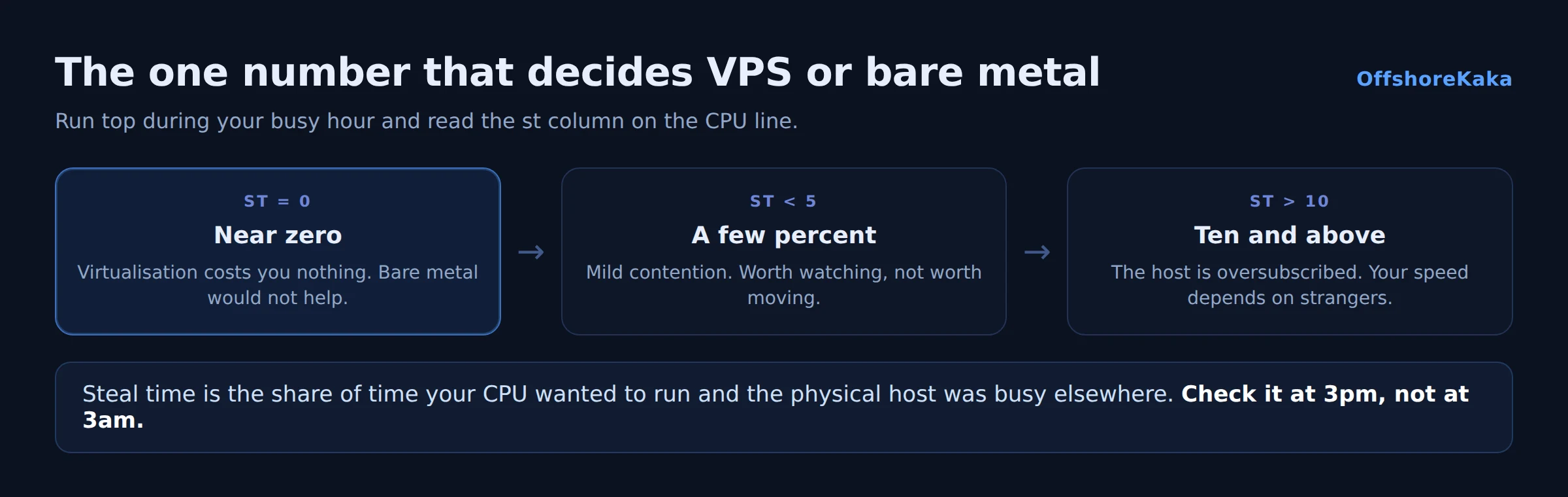
There is one measurement that tells you whether virtualisation is costing you anything. Run top and look at the st column on the CPU line. That is steal time: the percentage of time your virtual CPU wanted to run and the physical host was busy with someone else.
top -bn1 | head -3Zero or near zero means virtualisation is costing you nothing and bare metal would not help. Consistently above a few percent means the host is oversubscribed and you are being slowed by other tenants. Above ten percent, moving is worth it.
Check it during your busy period, not at midnight. This one number saves people a lot of money that would otherwise go on hardware they did not need.
Which to choose
Choose a VPS when: traffic is bursty; you might need to resize; you want a new environment in minutes; the workload is a normal website; or your budget matters more than the last twenty percent of performance.
Choose bare metal when: load is sustained rather than spiky; the database is larger than any VPS plan’s memory; disk I/O is constant; you need a specific RAID configuration; steal time on your current VPS is consistently high; or you are running enough VPS capacity that one machine is cheaper.
Cost at scale
The crossover is worth calculating rather than guessing. Add up what you currently spend on VPS capacity and compare it against a single dedicated server with the same total resources. Dedicated usually wins on raw resource per currency once you are running the equivalent of three or four mid-sized VPS instances.
But add the other side of the ledger. One machine is one point of failure, where several VPS instances across different hosts are not. And a dedicated server takes hours or days to replace, where a VPS is minutes. If uptime has a price for you, that difference is part of the calculation.
A common middle path is a dedicated server for the database and steady workload, with VPS instances for anything that needs to scale up and down.
Deciding checklist
- Steal time measured during a busy period.
- Load average compared against core count.
- Database working set compared against available memory.
- Disk I/O checked with the
wafigure in top. - Traffic pattern identified as steady or bursty.
- Replacement time considered, not just monthly price.
- Backup and failover plan in place for a single machine.
Not sure which you need?
OffshoreKaka runs both KVM VPS and bare metal in Amsterdam and Frankfurt, so you can start on a VPS and move to dedicated hardware without changing provider or jurisdiction.
FAQ
How much faster is bare metal really?
For CPU work, a few percent. For disk heavy work, potentially several times, because you are not sharing spindles or NVMe queues with other tenants. The gap is almost entirely about I/O and about memory ceilings, not about raw processor speed.
Can I move from VPS to dedicated later?
Yes, it is a normal migration: copy files and database, test on the new machine, then switch DNS. Staying with the same provider makes it easier, since both machines can be on the same network during the move. Our migration guide covers the sequence.
Is a dedicated server more secure?
Marginally, in that you are not sharing a hypervisor. In practice both are as secure as you make them, and almost every real compromise comes from an unpatched application rather than from a neighbour. Our security checklist applies to both equally.
What about managed dedicated hosting?
Worth pricing if you need the hardware but not the responsibility. You get the machine with the provider handling patching, monitoring and hardware issues. It costs more per month and less in your time, which for a business is usually the better trade.